$59/month· 14-Day Free Trial
No credit card required · Cancel anytime · Your customers billed in CAD
Live demo — go ahead, scroll & tap it
my.snowbosspro.com
Spinning up your live demo…

The full software you run everything from — storm dispatch, route building, crew tracking and billing.

For Canadian Snow & Ice Contractors

Snow Removal Software for Canada
Your Customers Billed in Canadian Dollars

Canadian snow removal is a night business run from a truck cab. The storm decides your schedule, the contracts decide your revenue, and the difference between a profitable winter and a brutal one is route order and billing that keeps up with the weather. SnowBossPro dispatches your storms, runs your routes in drive order, and bills every account in CAD through your own Canadian Stripe account — per push, per event, or flat seasonal.

Start Your 14-Day Free Trial
No credit card required  ·  14-day free trial  ·  from $59/mo after
CA$
Customer Billing — Native, Not Converted
Nov–Apr
Built for a Six-Month Season
3 a.m.
When Your Routes Roll — and It Works
$59
Flat Monthly — Everything Included

Most “Demos” Are a Phone Call With a Salesperson.
Ours Is Live at the Top of This Page.

The big field-service platforms make you book a call, sit through a pitch, and ask permission to see the screen. We put the real software — the business dashboard, the crew app, and the customer app — right on this page. Click around. Nobody will phone you.

SnowBossProTypical Field Software
See the software before talking to salesLive demo on this pageBook a call, get a pitch
Customer invoices & card charges in CADNative — your own Canadian StripeVaries, often USD-only
Per-push, per-event, and seasonal billingAll three, per accountOne model, maybe two
Storm dispatch built for snowStart a Storm, circle the mapGeneric job scheduling
Crew app + customer appBoth includedAdd-on, or not offered
Pricing$59 flat, unlimited usersPer truck, per user, per module
Trial14 days, no cardDemo call first

Routes Rolling at 3 a.m. —
Every Driveway and Lot in Drive Order

When Environment Canada's warning turns into real accumulation at midnight, you don't have time to build tonight's plan from a spreadsheet. Hit Start a Storm, draw a circle around the area getting hit, and every snow account inside it queues for dispatch — split across your trucks, ordered by drive time, with the map in every driver's hand.

Storms don't respect business hours, and neither does SnowBossPro. The whole operation — who's been cleared, who's next, which truck is where — lives on one board you can run from the office or from the cab of your own truck between accounts.

  • Start a Storm and circle the map — every account inside queues instantly
  • Stops ordered by drive time so trucks aren't crossing town twice
  • Every driveway and lot on a live map with GPS truck positions
  • Run multiple pushes as the snow keeps falling — each one logged and billable
  • Drag-and-drop reordering when a priority account calls mid-storm
  • See stop counts, service types, and trucks needed before anyone leaves the yard
Tonight's Storm — Truck 2 Route
Stop 1 — Cleared 2:12 a.m.
Residential driveway + walk
Done
Stop 2 — Cleared 2:31 a.m.
Commercial lot · plow + salt
Done
Stop 3 — In Progress
Residential driveway · 12 cm
Plowing
Stop 4 — 4 min drive
Next in drive order
Up Next
No phone tree. No group text.
Every driver has the route before the first pass.

Your Customers Pay in Canadian Dollars.
Because That's What They Have.

This is the part most US software gets wrong — and the part we built natively. Set your Country to Canada in Company Info, connect your own Canadian Stripe account, and every invoice, card-on-file charge, and payment link your customers see runs in CAD. Not converted at checkout. Not “USD, your bank will sort it out.” Canadian dollars, settling to your Canadian account.

Not a Display Setting — the Whole Billing Rail

The screenshot on the right is a real payment page from the platform: a customer of a Canada-set company checking out on a CA$ invoice. When the country on the account is Canada, CAD flows through everything downstream — the invoice your customer opens, the checkout they pay on, the card charge on their statement, the payout that lands in your bank.

  • Every invoice issued in CAD — the amount your customer agreed to is the amount they pay
  • Card-on-file charges run in CAD through your own Canadian Stripe account
  • Payment links and the customer app checkout show CA$ — no exchange-rate surprises on their statement
  • Estimates and seasonal contracts priced in the currency you quote in
  • One switch in Company Info — set Country to Canada and you're billing like a Canadian company, because you are one

One honest note: the SnowBossPro subscription itself bills in US dollars and your bank converts it — the same as any US-priced software you already pay for. Everything your customers touch is CAD.
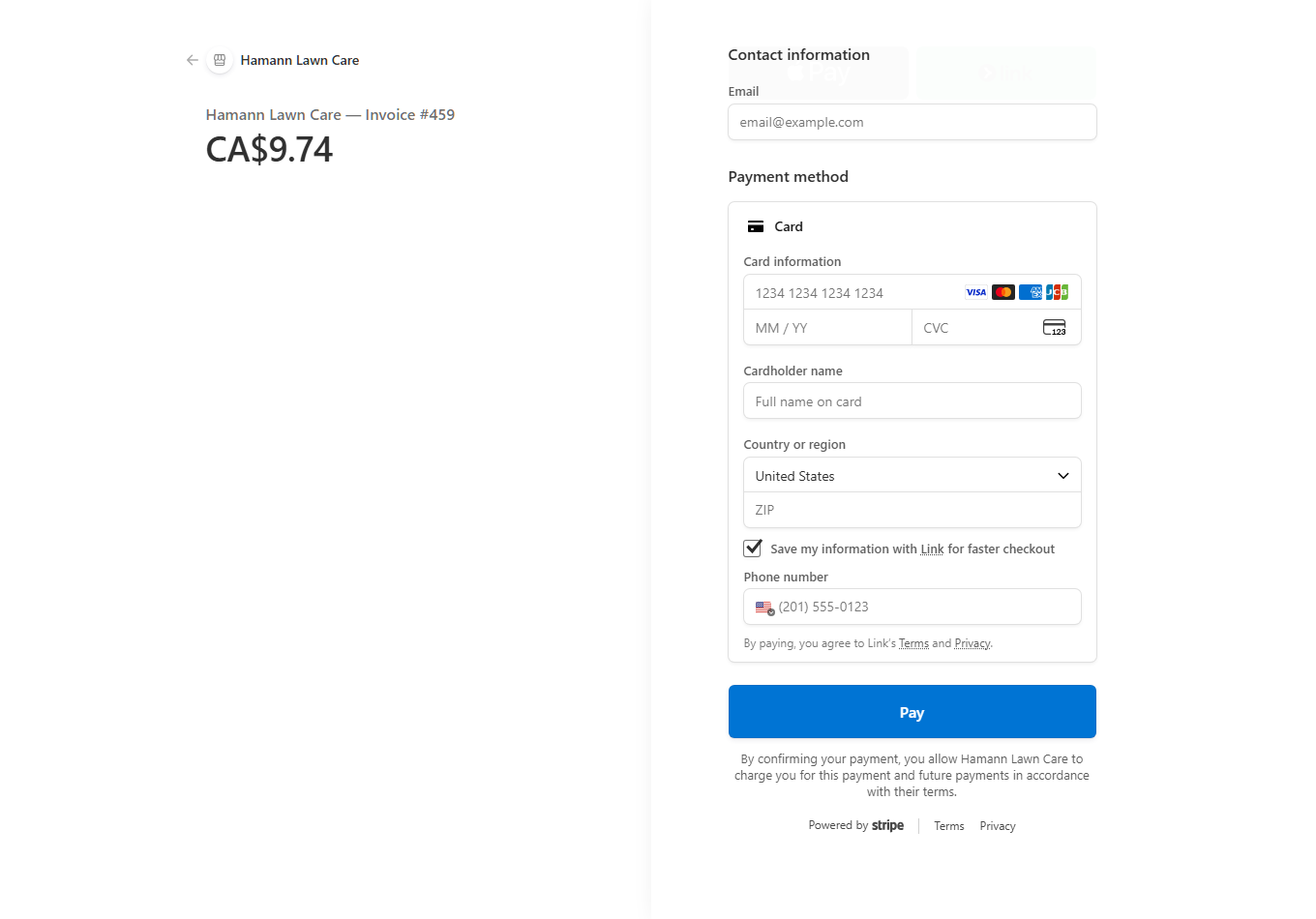
Stripe checkout page for Hamann Lawn Care — Invoice #459, showing a CA$9.74 total with card payment fields

A real payment page from the platform — a Canada-set company's customer pays in Canadian dollars. (The founder's own company.)

Per Push. Per Event. Flat Seasonal.
Run All Three in the Same Winter.

A Canadian winter is six months of revenue riding on how you structured your contracts in October. Some customers want to pay for exactly what they get. Some want one number for the whole season. A real book of business has both — and your billing has to keep up with the storms either way.

Per Push & Per Event

The invoice goes out while the customer's driveway is still clean. The moment your driver marks a stop done, the charge is queued — per push if you bill every pass, per event if you bill once per storm no matter how many times you returned. Card on file gets charged automatically, in CAD.

  • Auto-invoice the moment a stop is marked cleared
  • Per-event billing rolls multiple pushes into one storm charge
  • Card-on-file means no envelopes, no e-transfer chasing
  • Every charge tied to the timestamped service record behind it

Flat Seasonal Contracts

Seasonal contracts are how you smooth cash flow through a winter that runs November to April — steady money in a light December, fair money in a February that won't quit. SnowBossPro tracks every visit against the contract so you always know what each agreement actually cost you to service.

  • Flat seasonal agreements with every visit logged against them
  • Mix seasonal and per-push accounts on the same route
  • Estimates and contract records customers accept online
  • Know which contracts made money when the season ends

The storm decides when you work. Your contracts decide what you earn. SnowBossPro makes sure the billing never falls behind either one.

“You Never Did Our Lot.”
Yes You Did — and Here's the Record.

Every contractor has had the call: a customer swears their lot wasn't cleared, or a property manager questions an invoice from three storms ago. Memory doesn't settle that conversation. A record does. SnowBossPro logs every visit automatically the moment your driver marks it done — timestamp, GPS location, snow depth, and a photo of the finished work.

It's your paper trail for the whole winter, searchable by account, site, driver, or storm — so when someone asks what happened at 2 a.m. on January 14th, you can answer in thirty seconds instead of digging through texts.

  • Timestamp and GPS captured on every completed stop
  • Before/after and proof photos attached to the visit
  • Snow depth and services performed logged per push
  • Filter the season's records by account, site, driver, or date
  • Print-ready site logs for commercial accounts that ask for them
  • Every invoice traceable to the visits behind it
Visit Record — Jan 14, 2:07 a.m.
Lot cleared & salted
Marked done 2:07 a.m. · GPS on site
Logged
Snow depth: 14 cm
Recorded by driver at the stop
Push 2
Proof photo attached
Timestamped · tied to this visit
📷
The conversation ends here.
Pull any visit's record in seconds, all season long.

Built for a Driver in a Warm Truck
Wearing Gloves at 3 a.m.

Your drivers don't need a desktop dashboard bouncing around the passenger seat. They need tonight's stops, in order, with the notes that matter — where the customer wants the pile, which lot has the low overhang, which driveway hides a curb under the snow. The crew app puts exactly that on their phone and nothing else.

  • Tonight's route in drive order with the map one tap away
  • Site notes and photos on every stop — no radio calls to ask where the pile goes
  • One tap to mark cleared, log the depth, snap the proof photo
  • Skip a stop with a reason and dispatch sees it instantly
  • Big buttons and clear status — usable with cold hands in a dark cab
  • Everything syncs live to the storm board back at the office
Driver View — 6 Stops Left
14 Birchwood Cres.
Pile snow LEFT of garage · gate code 4412
Current
Cedar Plaza — rear lot
Plow + salt walkways · watch loading dock
Next
22 Fieldstone Dr.
Driveway + walk · car usually in laneway
3rd
✓ Mark Cleared
📷 Photo

They See the Visit Happened.
So They Don't Call the Office at 6 a.m.

Half the phone calls in a storm are the same question: “Have you done mine yet?” Give every customer their own app — installed straight from a text link, no app store, no password — and the question answers itself. They open it, see the visit is done or that they're on tonight's route, and put the phone down.

✓See that the visit happened — with the time and the photos — without calling anyone
✓View and pay CAD invoices from their phone, card on file, one-tap Pay Now
✓Full service history for the season — every visit, every note, in one place
✓Get alerts their way — the night before, when the truck is close, when the work is done
✓Update their card, contact you, or refer a neighbour on the same street
✓You control exactly which features each customer sees — every switch is yours

Fewer “have you done mine yet?” calls. More time running the storm.

Built for the Winter You Actually Get —
Not the One Software Companies Imagine

A Canadian season isn't a few plowable days between mild weeks. It's a business that runs November to April: lake-effect streamers that bury one side of town and miss the other, prairie systems that arrive with wind and stay for days, freeze-thaw cycles that turn every parking lot into a salting job, and the odd storm that has you back at the same driveway three times before sunrise. SnowBossPro is built for a season that long and that relentless — because the tools that fall apart in week two of a hard winter cost you customers you spent years earning.

🌨️

Lake-Effect & Squall Bands

When a streamer dumps 30 cm on one corridor and leaves the next town dry, circle just the area that got hit and dispatch it. You're not running the whole book for a storm that only touched half of it.

🌬️

Prairie Systems & Drifting

Multi-day events with wind mean return trips — the same lots, again and again. Multiple pushes per storm are first-class: each pass logged, timestamped, and billable on its own.

🧂

Salting & De-Icing Work

Freeze-thaw weeks are salt weeks. Track de-icing visits as their own service type with their own pricing — the add-on work that fills the gaps between plowable storms.

📅

A November-to-April Season

Six months of storms, contracts, and records in one place. When April finally comes, the whole season — every visit, every charge, every account — is there to review before you price next year.

💵

CAD From End to End

Quotes, contracts, invoices, and card charges all in Canadian dollars through your own Canadian Stripe account. Your customers never do exchange-rate math on a snow bill.

🌙

Night-Business Reality

The storm board, the crew app, and the automated customer alerts all assume the work happens while your customers sleep — because in this business, it does.

One Flat Price. Every Feature.
No Per-Truck Math.

We've been the customer — paying $500 to $700 a month for field software where texting was an add-on, users cost extra, and the reporting module was another invoice. SnowBossPro is one price with everything in it.

$59 a month. Everything included. Storm dispatch, drive-order routing, CAD customer billing, per-push and seasonal contracts, service records with photos, the crew app, the customer app, automated alerts — all of it, for your whole team. No per-user fees, no per-truck fees, no locked tiers.

The subscription bills in US dollars and your bank converts it — we say that plainly because you'd find out anyway, and we'd rather you hear it from us. Your customers, though, are billed in Canadian dollars through your own Canadian Stripe account, every time.

14-day free trial, no credit card. No contracts. Cancel anytime.

Snow Removal Software in Canada — Straight Answers

Does SnowBossPro work in Canada?

Yes — today, not "coming soon." Storm dispatch, circle-a-map routing, scheduling, estimates, customer records, the crew mobile app, and the customer app all work in Canada right now. Customer billing is native too: set your Country to Canada in Company Info, connect your own Canadian Stripe account, and every invoice, card charge, and payment link bills your customers in Canadian dollars.

Can I invoice and charge my customers in Canadian dollars?

Yes, natively. This isn't a currency display trick — when your company country is set to Canada, every invoice you send, every card-on-file charge, and every payment link runs in CAD through your own Canadian Stripe account. Your customer sees CA$ on the checkout page, pays in CA$, and the money settles to your Canadian account.

What currency is the SnowBossPro subscription itself billed in?

The from $59/month subscription is billed in US dollars, and your bank converts it at its exchange rate — the same way any US-priced software you already use works. Everything your customers see and pay is in Canadian dollars; the USD part is only between us and you.

Does automated texting work in Canada?

Yes, with one honest caveat: Canadian carriers require registering a Canadian sending number before automated texts can go out, and we set that up with you during onboarding — it isn't instant on day one. Email alerts and customer-app notifications work from the moment you sign up, so your customers still get their storm updates while the number registration completes.

Can I bill per push, per event, and by seasonal contract at the same time?

Yes. Different accounts, different deals — that's how snow works. Put your seasonal-contract customers on a flat agreement, bill your per-push customers automatically the moment a crew marks their driveway or lot cleared, and bill per-event accounts once per storm. Cards on file get charged without you chasing anyone, and every charge ties back to the service record behind it.

How much does SnowBossPro cost, and is there a trial?

from $59/month flat, with every feature included — storm dispatch, routing, CAD customer billing, the crew app, the customer app, service records, automated alerts, all of it. No per-truck fees, no per-user fees, no locked tiers. The trial is 14 days, full access, no credit card required.

Want the full feature rundown? See the complete platform overview — or just use the live demo at the top of this page.

The Next Storm Is Already
on the Long-Range Forecast.

Run it from one board — routes in drive order, customers billed in Canadian dollars, and a record of every driveway and lot you cleared. Try the whole platform free for 14 days.

Start Your 14-Day Free Trial
No credit card required  ·  14-day free trial  ·  from $59/mo after